Built for board game creators

Design without drawing.
Playtest without waiting.
Print with confidence.

Your spreadsheet becomes a deck. Design one template, generate every card, and export print-ready files. All in one browser tab. No artistic talent required (we checked).

Free to try · Design your first deck today
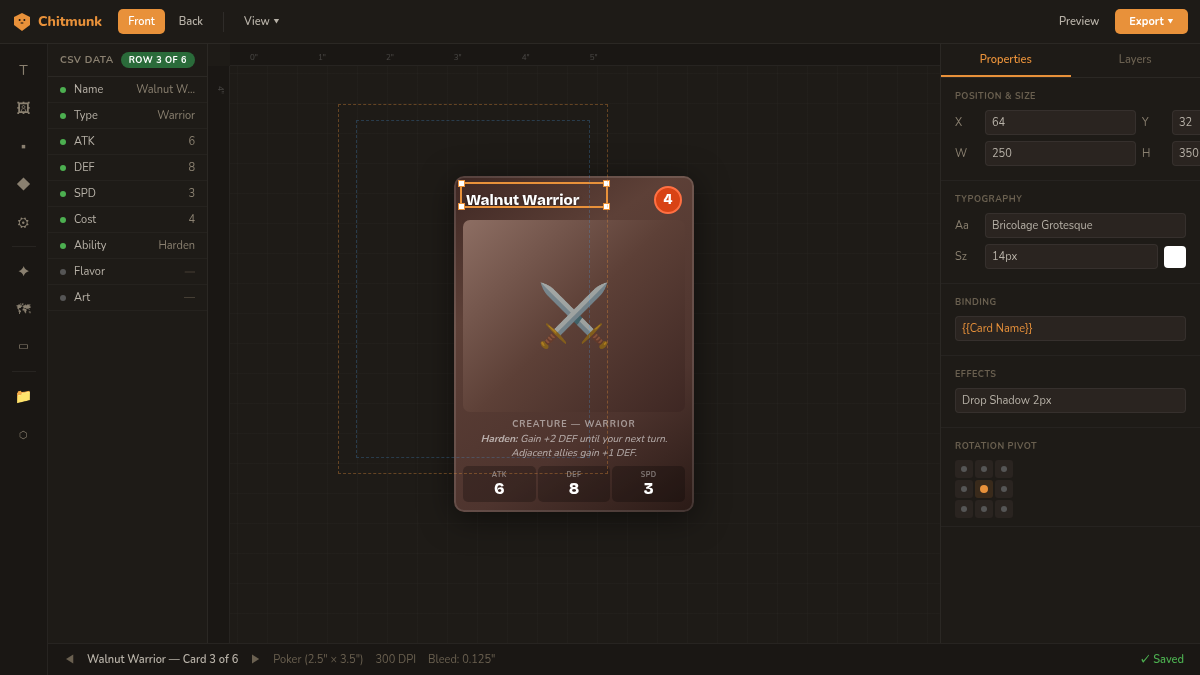
Chitmunk editor showing Walnut Warrior card with CSV data panel, properties, bleed zones, and snap guides

Design one card. See all three update.

No sign-up required. Edit the name, adjust the stats, and watch every card in the deck change from one template.

180+
Card & Board Sizes
170+
Starter Templates
39
Ready-Made Game Pieces
275K+
Icons & Assets
1,000+
Fonts

Built for board game designers, TTRPG players, tarot creators, and more.

Design, test, and print — without switching tools

Every step of your game's journey, from spreadsheet to printed deck, happens in one place.

Your spreadsheet becomes a deck

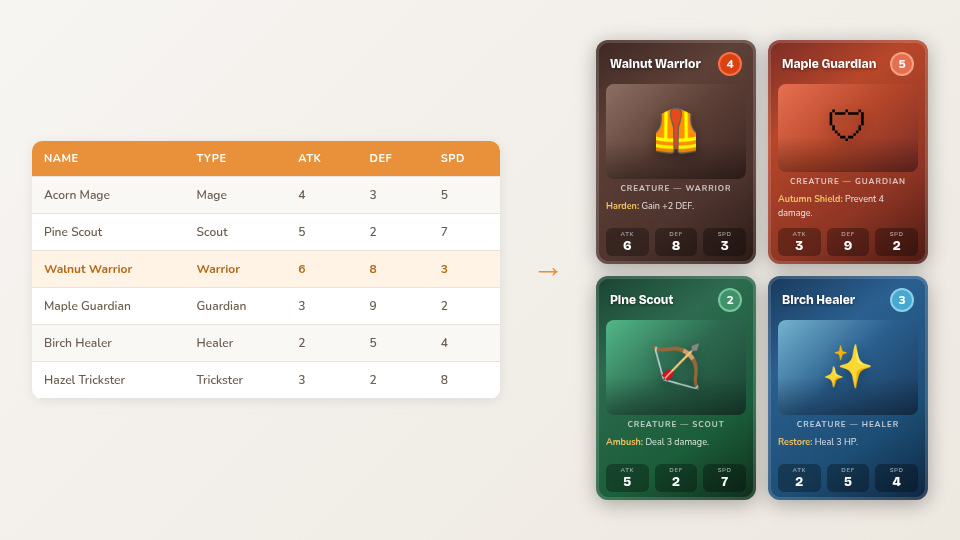
Import a CSV or connect Google Sheets. Bind any text, image, or visibility rule to a column. Change one cell and every card with that template updates instantly.

  • {{Column Name}} syntax, no code, no plugins
  • Conditional visibility: show/hide elements per card
  • Live Google Sheets sync keeps your database current
  • Batch image binding with fuzzy filename matching
See the Data Guide
CSV spreadsheet data merging into generated game cards

A component editor that just works

Drag, drop, align, and style. Every element snaps to grid, aligns to guides, and renders pixel-perfect for print.

  • Text with 12 effects (outline, glow, emboss, shadow, and more)
  • 22 shape types with gradients, patterns, and blend modes
  • Smart snap guides, rulers, bleed/safe zone overlays
  • Groups, clipping masks, symbol library
Open the Editor
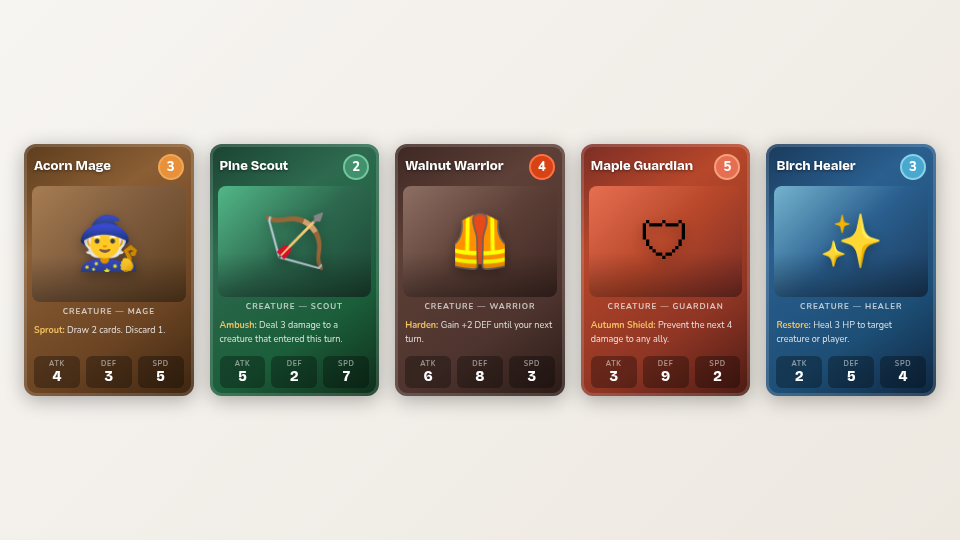
Five cards from Chitmunk the Game displayed in preview grid

Functional components in seconds

Race tracks, tech trees, territory maps, spinners, hex grids, and more. Tweak parameters, get a playtest-ready component without drawing anything.

  • Hex grid, square grid, point-to-point maps
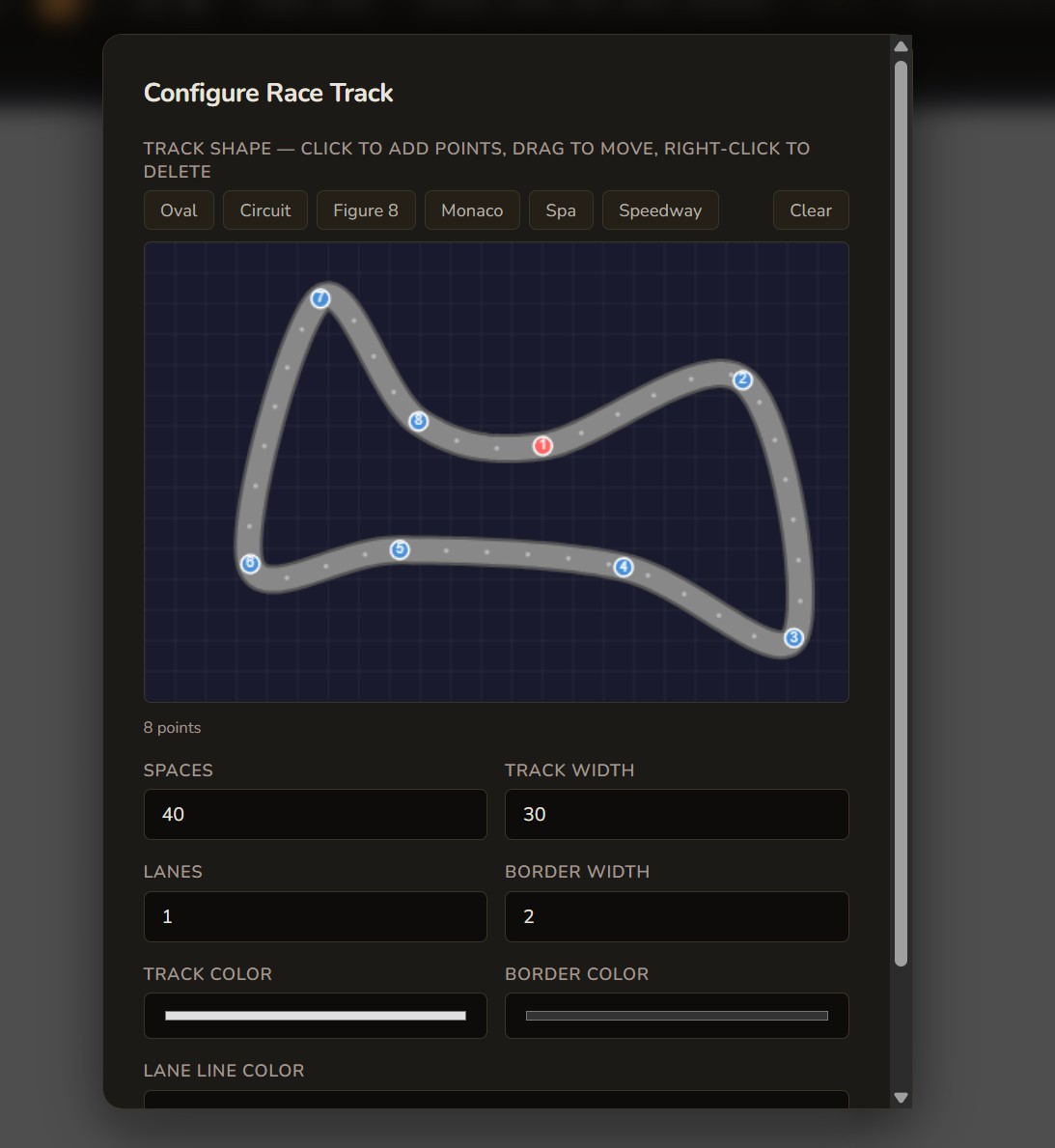
  • Race tracks with configurable lanes and checkpoints
  • Tech trees, spinners, dice faces, score tracks
  • Interactive territory map editor
Explore Generators
Race track generator with configurable lanes, checkpoints, and track shapes

AI art from your spreadsheet

Stop waiting for art to playtest your game. Write one prompt recipe and Chitmunk illustrates every card from your data. Unique art per card, consistent style across your deck. Prototype with real visuals, then commission an artist when your game is ready for print.

  • 190+ prompt recipes across fantasy, sci-fi, horror, nature, and modern themes
  • 16 art styles: Classic Fantasy, Watercolor, Anime, Gothic Horror, Pixel Art, and more
  • Batch mode: illustrate 100 cards from one recipe while you get coffee
  • Free tier to test recipes, upgrade for instant generation

Powered by FLUX and Leonardo AI

See How It Works
Recipe
a fearsome {{Type}} called {{Name}}, {{Flavor Text}}
Dragon
Elf
Castle
One recipe → every card gets unique art

Test before you print

Catch broken cards and imbalanced mechanics before you spend money printing. Chitmunk includes a built-in playtest simulator and data-driven balance analytics.

  • Virtual tabletop: draw cards, roll dice, track turns
  • Cost curves, stat analysis, synergy detection
  • Monte Carlo simulation: 10,000 test hands
  • Strictly-better-card detection
  • Share your project for live collaborative editing (Legendary)
Learn About Playtesting
🎮
Playtest Simulator
Draw, shuffle, roll, track
📊
Balance Lab
Analyze, simulate, refine

Preview your game before you print

Rotate, inspect, and share real-time 3D mockups of every component type. See exactly what your game will look like on the table.

  • Tuck boxes with accurate fold lines and your artwork
  • Cards, dice, boards, mats, standees, and more
  • Drag to rotate, zoom to inspect details
  • Share 3D previews with collaborators and playtesters
Try the 3D Preview
📦

Scroll down to load 3D preview

One project, every destination

Tonight's kitchen table test. Tomorrow's online playtest. Next month's print run. Same project, same file. Export to TheGameCrafter, Tabletop Simulator, or print-ready PDF.

  • 300 DPI PNG, JPEG, WebP (single or batch ZIP)
  • PDF with crop marks, CMYK PDF with ICC profiles
  • TTS spritesheets, TheGameCrafter direct upload
  • Sell sheets, dieline templates, print-at-home 9-up
View Export Options
PNG / ZIP
300 DPI card images
PDF
Crop marks & vector
TTS
Tabletop Simulator
CMYK
Print-shop ready
Print-ready export from $5/mo (billed annually)

Spreadsheet to table in four steps

Bring your game data. Leave with a playtest-ready deck. The prototype you test is the file you ship.

1

Bring your spreadsheet

Import a CSV or connect Google Sheets. Your card names, stats, costs, and types are the source of truth.

Data merge guide →
2

Design one template

Pick a starter template or start blank. Bind text and images to columns. One template generates every card.

Getting started →
3

Test and balance

Play on the virtual tabletop or export a 9-up PDF. Balance Lab catches what playtesting misses. Working with a co-designer? Edit the same project in real time.

Playtest guide →
4

Print when ready

300dpi, CMYK, crop marks, vector PDF. Upload to your printer directly. No starting over in another tool.

Export guide →

Your current workflow vs. this one

If you've ever rebuilt a deck after one playtest, you know the pain. Here's how it changes.

The old way
  • Change one stat, manually update 54 cards
  • Design in Figma, merge in nanDECK, export manually
  • Compose TTS spritesheets by hand, re-upload every time
  • Discover broken cards after 20 playtests and one very upset friend
  • Prototype in one tool, rebuild for production in another
  • Draw game boards from scratch in Illustrator
  • Pay for Figma + plugins and still lack print-readiness
  • Email project files back and forth, hope nothing gets overwritten
With Chitmunk
  • Change a spreadsheet cell, every card updates
  • Design, merge, and export in one tool
  • Auto-generate TTS spritesheets from the same project
  • Balance Lab catches broken cards with math. “It feels fine” is not a balance strategy
  • Your prototype IS your production file
  • 39 generators: hex grids, tracks, tech trees in seconds
  • Free to design, $5/mo for print-ready export (billed annually)
  • Invite your co-designer to edit live — no file passing
  • Generate card art with AI — illustrate an entire deck in minutes

Free to design and playtest. Upgrade to print, collaborate, and generate AI art.

Every design tool, 170+ templates, and solo playtesting — free forever. Add print-ready export, AI card art, and team collaboration when your game is ready.

Monthly
Annual Save 37%
Print-Ready
Rare
$59.99
per year ($5.00/mo)
Everything in Common, plus print-ready export and AI-powered card art.
  • Crisp 300 DPI print-ready export
  • PDF with crop marks, batch ZIP, print-at-home
  • Tabletop Simulator, Screentop & Tabletopia export
  • Google Drive & Sheets sync
  • 100 AI credits/mo — generate card art
  • 2-player multiplayer playtest
  • 5 GB cloud storage
Get Early Access
Collaboration
Legendary
$99.99
per year ($8.33/mo)
Everything in Rare, plus real-time collaboration and premium AI art styles.
  • CMYK PDF & TheGameCrafter direct upload
  • Real-time co-editing with cursor presence
  • Multiplayer playtesting (up to 8 players)
  • 500 AI credits/mo + premium models
  • 20 GB cloud storage
Get Early Access

Less than Netflix. More useful than that shelf of unfinished prototypes.

Compare all plans →

Your next playtest is closer than you think.

Bring a spreadsheet. Leave with a deck.

Get Early Access

Built by a designer who picked up his board game after 8 years, opened his old design tool, and thought “surely something better exists by now.” It didn’t. So he built it.